Quirks of a CPU: Cache Aliasing
Table of Contents
All non-trivial abstractions, to some degree, are leaky.
— Joel Spolsky, The Law of Leaky Abstractions (2002)
This is a post about small, easy-to-miss changes with consequences nowhere near proportional to their size - the kind a code reviewer would wave straight through without a second thought. One of them, in particular, is going to cost eight times the runtime before this post is done, and no amount of reading the code will tell you why.
The gap between the language and the machine #
Programming languages, more or less, still model something close to an idealized Turing machine - a tape, a pointer into it, and the assumption that moving the pointer and reading a cell costs the same no matter where on the tape you are.
That assumption is false on every CPU made in the last few decades, and it’s false in a bunch of different, unrelated ways at once:
- caches make some addresses dramatically cheaper to touch than others depending on what you touched recently
- the TLB does the same thing for virtual-to-physical address translation
- instruction fetch has its own separate cache with its own separate failure modes
- hyperthreading means the “CPU” executing your instructions might not even have exclusive use of its own execution units while it’s doing it.
And the list goes on. None of this is exotic or edge-case - it’s just what the hardware actually is, underneath the tape-and-pointer story the language tells you. If you care about runtime performance, rather than the theoretical one, you eventually have to know at least a little about this layer. Nothing above it is going to warn you when you’ve stepped on it.
Next I’ll focus on showing practical effects of an obscure but important quirk of CPU caches: cache aliasing.
A quick primer on cache hierarchy, and where aliasing comes from #
The part of this that the rest of the post is actually about is caches specifically, so a quick refresher.
A CPU doesn’t talk to RAM directly for every access - there’s a small hierarchy of progressively bigger, slower caches sitting between the core and main memory. Whichever one actually holds the data you want determines whether a read costs a handful of cycles or a couple hundred.
Rather than make up round numbers,
here’s the actual hierarchy on the machine this post’s numbers come from.
This runs on an AMD Ryzen 7 7840HS - Zen 4, codename “Phoenix,” a laptop/mobile
part, not a server chip. Sizes are read straight from
/sys/devices/system/cpu/cpu0/cache/; latencies aren’t something you can read
out of sysfs, so those are published figures for this specific chip, converted
to cycles at this machine’s ~3.79GHz:
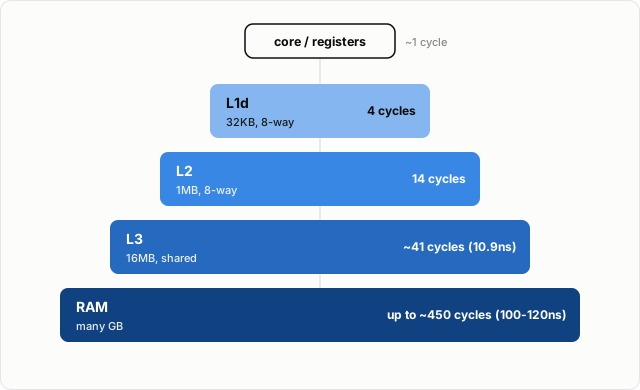
Cache hierarchy: AMD Ryzen 7 7840HS (Zen 4, “Phoenix”). This post’s test machine. Bar width is illustrative, not to scale.
L1d/L2 latency is a general Zen 4 core figure; L3/RAM latency is chip-specific, converted to cycles from measured nanoseconds at this machine’s own clock speed - sources are in the references section at the end.
Each of those levels is carved up into fixed-size lines (64 bytes is typical), and the lines are grouped into sets. An address doesn’t get to live just anywhere in the cache - a slice of its own bits determines which set it’s allowed to land in, and a cache is only associative enough to hold so many lines per set at once (8-way is common for L1) before something has to get evicted to make room. Normally this works out fine, because normal access patterns spread themselves across plenty of different sets.
Cache aliasing is what happens when they don’t. If the stride between the addresses you’re touching happens to be a multiple of the cache’s entire set-indexing range, every single address you touch maps to the exact same set, no matter how far apart they are in memory. The cache can hold maybe 8 of those before it starts thrashing, and you’re asking it to hold however many you’re actually touching.
The classic way to back into this by accident is a power-of-two stride, which is exactly what a power-of-two row length gives you in a 2D array. These practical examples may look a bit contrived. But the effect is strongest exactly where we reach for power-of-two values for dimensions and strides - which is the default we’ve all been taught to use, for better or worse.
Reproducing it on a real machine #
Take an N x N matrix of doubles, stored row-major, and sum it column by column instead of row by row:
for (j = 0; j < n; j++)
    for (i = 0; i < n; i++)
        sum += a[i * ld + j];
ld here is the row length - the leading dimension, in the usual
terminology. With no padding, ld equals n, and if n is a power of
two, every step of that inner loop lands in the same set:
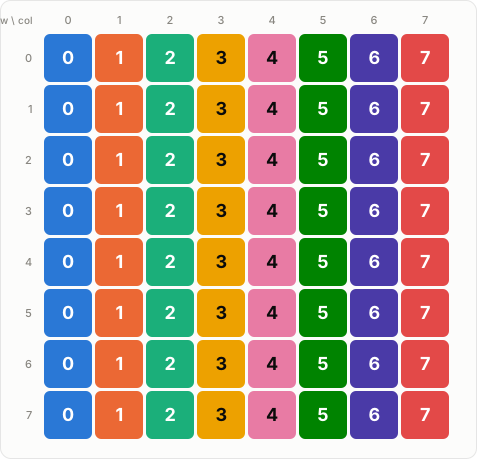
8x8 matrix, row length 8 (pow2 stride). set index = column number
Scaled down to a toy 8-set cache instead of a real 64-set one so it fits on screen, but the arithmetic is identical. Row length 8, and the set index is just the column number - every row repeats the same 8 colors in the same order, so the whole column piles into one set, over and over, for every single row.
The fix is to pad the row by one unused element. ld becomes n + 1,
the stride stops being a round power of two, and the exact same 8 colors
spread out instead:
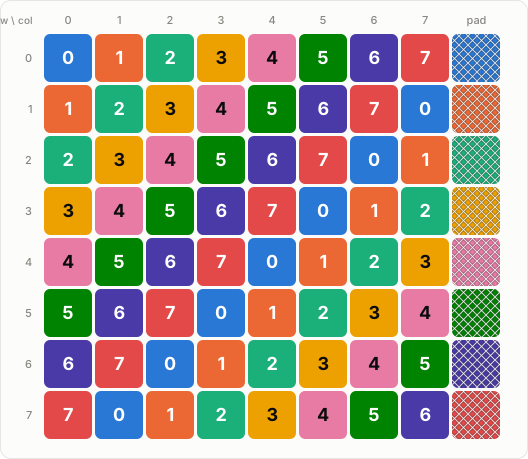
8x8 matrix, row length 9 (padded). set index = (row + col) mod 8
One extra double per row, allocated and never read, and the set index
becomes (row + col) mod 8 instead of just col - one of each color per
row and per column now, instead of a whole column piling into one.
To actually measure this rather than just reason about it, I used
perf stat with cache-references and cache-misses alongside
wall-clock timing. That’s all wrapped in a small script (bench.sh in
the repo): it builds both variants, runs each one a handful of times per
size to smooth out noise, and reports the miss rate and the speedup
relative to the slow case. Numbers from actually running it (full code in
matrix-cache-aliasing if you want to poke at it):
| N | access pattern | LD | time | miss % | speedup |
|---|---|---|---|---|---|
| 512 | row-major (baseline) | 512 | 0.0043s | 0.95% | 6.37x |
| 512 | column, pow2 LD | 512 | 0.0274s | 40.44% | 1.00x |
| 512 | column, padded LD | 513 | 0.0031s | 0.44% | 8.84x |
| 1024 | row-major (baseline) | 1024 | 0.0026s | 0.53% | 9.04x |
| 1024 | column, pow2 LD | 1024 | 0.0235s | 37.75% | 1.00x |
| 1024 | column, padded LD | 1025 | 0.0030s | 0.19% | 7.83x |
| 2048 | row-major (baseline) | 2048 | 0.0030s | 0.47% | 8.33x |
| 2048 | column, pow2 LD | 2048 | 0.0250s | 25.29% | 1.00x |
| 2048 | column, padded LD | 2049 | 0.0092s | 3.99% | 2.72x |
| 4096 | row-major (baseline) | 4096 | 0.0120s | 0.19% | 22.20x |
| 4096 | column, pow2 LD | 4096 | 0.2664s | 21.59% | 1.00x |
| 4096 | column, padded LD | 4097 | 0.0441s | 5.88% | 6.04x |
Same data, and arguably the same order of operations too, since padding doesn’t change what gets summed, only where each element happens to sit in memory. One version still ends up an order of magnitude slower, for reasons you would not find by just reading the loop.
A more realistic example: matrix multiply #
The column sum makes the point cleanly, but it’s also obviously a demonstration - nobody accidentally writes a column-sum microbenchmark. A naive matrix multiply is closer to something most people write at some point without thinking twice about it, often as a first pass before reaching for a real linear algebra library:
for (i = 0; i < n; i++)
    for (j = 0; j < n; j++)
        for (k = 0; k < n; k++)
            c[i][j] += a[i][k] * b[k][j];
b[k][j] is the same column-stride access as before, just one level
deeper. Now it’s sitting inside an O(n^3) loop instead of an O(n^2) one,
so whatever it costs you gets multiplied out accordingly
(matmul-cache-aliasing):
| N | layout | LD | time | miss % | speedup |
|---|---|---|---|---|---|
| 256 | pow2 LD | 256 | 0.0275s | 1.18% | 1.00x |
| 256 | padded LD | 257 | 0.0094s | 0.30% | 2.93x |
| 512 | pow2 LD | 512 | 0.7277s | 60.82% | 1.00x |
| 512 | padded LD | 513 | 0.0841s | 5.07% | 8.65x |
| 1024 | pow2 LD | 1024 | 6.3079s | 49.36% | 1.00x |
| 1024 | padded LD | 1025 | 0.8995s | 1.90% | 7.01x |
Up to 8.65x faster at N=512, from allocating one column you never actually use for anything.
Maybe this is only a hand-rolled-C problem #
Both examples so far are C, which raises an obvious question: is this a “writing your own loops” problem, or does it show up in the libraries people actually reach for day to day?
I tried reproducing it in numpy to find out, and the first two things I tried
didn’t work at all. a.sum(axis=0) comes back basically the same speed
either way. That’s because numpy’s reduction iterates the outer axis and
vectorizes over whichever rows are contiguous, regardless of which axis
you told it to reduce along - it never actually walks down a column one
element at a time, no matter how you ask for it. a @ b barely moves
either, even with the plain reference BLAS this machine happens to have
installed rather than OpenBLAS or MKL, because matmul implementations are
specifically built around not doing this. Which is at least a partial
answer to the question: production numerical libraries do guard
against this, deliberately.
What does reproduce it is a.T.copy(). Transposing a view and forcing it
contiguous means numpy has to fill the result row by row - which means
reading the original column by column, exactly the access pattern from
the first example:
| N | layout | time | speedup |
|---|---|---|---|
| 1024 | pow2 | 0.0062s | 1.00x |
| 1024 | padded | 0.0008s | 7.50x |
| 2048 | pow2 | 0.0440s | 1.00x |
| 2048 | padded | 0.0104s | 4.24x |
| 4096 | pow2 | 0.5080s | 1.00x |
| 4096 | padded | 0.0432s | 11.76x |
Noisier than the C version - the speedup doesn’t scale smoothly with N the way the C benchmarks mostly do, it jumps around. But the effect is real, and in the same direction, at every size tested. So: numpy’s own built-in reductions and its matmul are both guarded, deliberately, by people who already knew about this. A plain array operation that happens to walk memory the wrong way is not.
So, proactively, then #
None of this throws an error. The column sum still adds up to the right
total, the matmul still produces the right matrix, a.T.copy() still
gives you a correctly transposed array - every one of these examples is
functionally correct the whole time, slow or fast. That’s most of why it’s
easy to miss: there’s no exception, no warning, nothing that distinguishes
the pathological version from the fine one except a stopwatch.
The examples in this post are deliberately extreme, chosen to make the effect impossible to miss. But the underlying mechanism doesn’t need an 8x or 9x gap to be real. A buffer that’s merely inconvenient-sized can lose you a smaller, quieter percentage that never gets big enough to trip the “something is obviously wrong” threshold at all - and just sits there as a permanent, invisible tax.
Profiling, in most places, is something you reach for reactively - after a thing is already visibly, unambiguously too slow, usually once you’ve ruled out the easier explanations. Compare that to how we treat correctness. Nobody waits for a bug report before running the test suite; tests run on every commit, whether or not anything looks broken, precisely because “looks fine” and “is fine” aren’t the same claim. Performance gets no equivalent default. Most code ships having never been profiled at all, not because it’s fast, but because nothing about it looked slow enough to bother checking.
That asymmetry is the actual point of this post, more than any specific number in any specific table. Profiling only reactively means only catching the bugs that are already expensive enough to notice - and cache aliasing, almost by design, doesn’t announce itself that way until it’s too late to be a quick fix.
The answer isn’t running perf on everything, which isn’t realistic and isn’t
really the point. It’s treating a baseline profiling pass - at least once, on
something closer to the real deployment hardware than a laptop - as a normal,
disciplined part of shipping code that touches memory at any real scale, the
same unglamorous way a test suite is just a normal part of shipping code that’s
supposed to be correct.
References #
- Ulrich Drepper - Memory part 2: CPU caches - from his “What Every Programmer Should Know About Memory” series; the canonical deep dive on cache associativity, conflict misses, and exactly this kind of power-of-two-stride aliasing
- TechPowerUp - AMD “Zen 4” Dies, Transistor-Counts, Cache Sizes and Latencies Detailed - L1d/L2 latency figures
- Chips and Cheese - Hot Chips 2023: AMD’s Phoenix SoC - L3/DRAM latency figures for this machine’s actual chip (Ryzen 7 7840HS, “Phoenix”)
- darfire/bloggy-code - matrix-cache-aliasing and matmul-cache-aliasing - full benchmark code and
bench.shfor the numbers in this post